
Delete Google Reviews – How to Remove Ratings [2026]
- Step-by-Step Guide for Deleting Google Reviews


Negative Google reviews are a decisive economic factor: a falling star average often leads directly to fewer customer inquiries. Whether you want to remove your own review as a private individual or take action against unfair criticism as an entrepreneur – this guide shows you all legal paths and strategies.
Delete your own Google review: How it works
There are many reasons to remove your own review: a misunderstanding has been resolved, the service has improved, or you simply want to protect your digital privacy. Deletion is possible for you as the author at any time and without giving reasons.
Quick Guide: Desktop (PC/Mac)
Managing via the browser offers the best overview of all reviews ever submitted.
- Access Google Maps: Visit www.google.com/maps
- Menu & Contributions: Click on the three-line icon at the top left or on your profile picture. Select “Your contributions”.
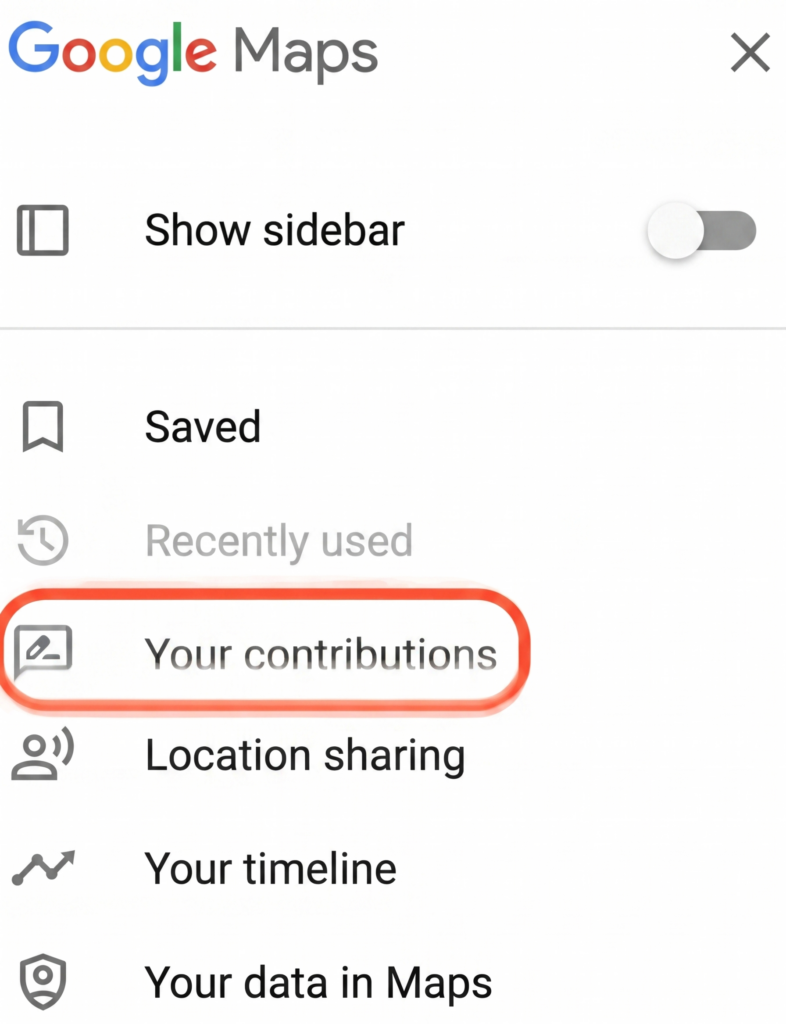
Managing via the browser offers the best overview of all reviews ever submitted.
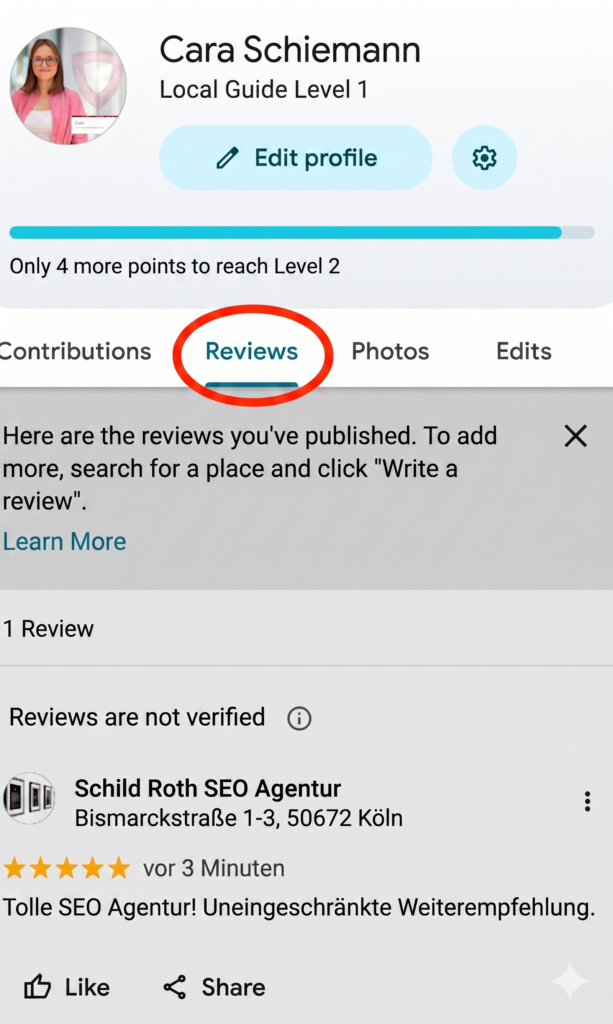
- Reviews Tab: Click on the “Reviews” tab. Here you will see a chronological list.
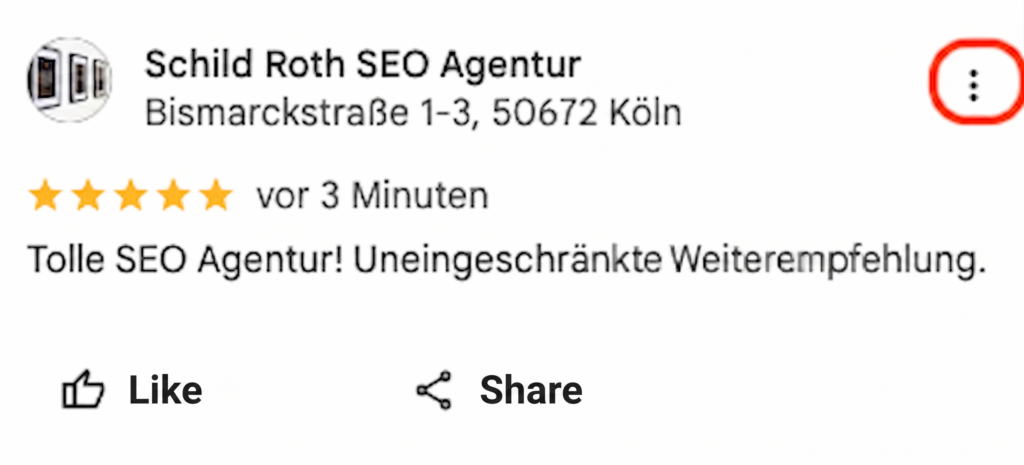
- Remove: Find the review. Click on the three vertical dots (⋮) next to the entry and select “Delete review”. Confirm the security prompt.
Quick Guide: Smartphone (iOS/Android)
Ideal for quick corrections on the go via the Google Maps app.
- Start App: Open Google Maps on your iPhone or Android device.
- Profile Icon: Tap on your profile picture or name initials at the top right.
- Your Profile: Select the item “Your Profile”.
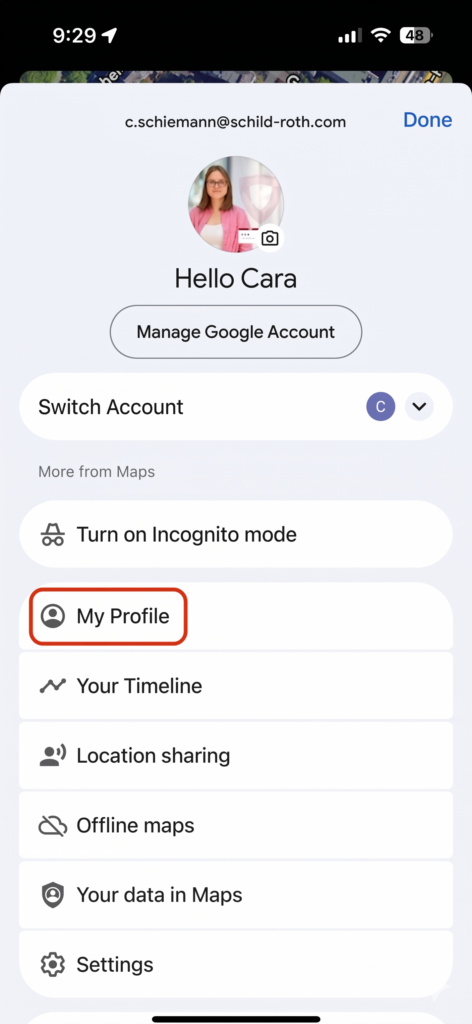
- Manage Contributions: Scroll down until you see the “Reviews” section.
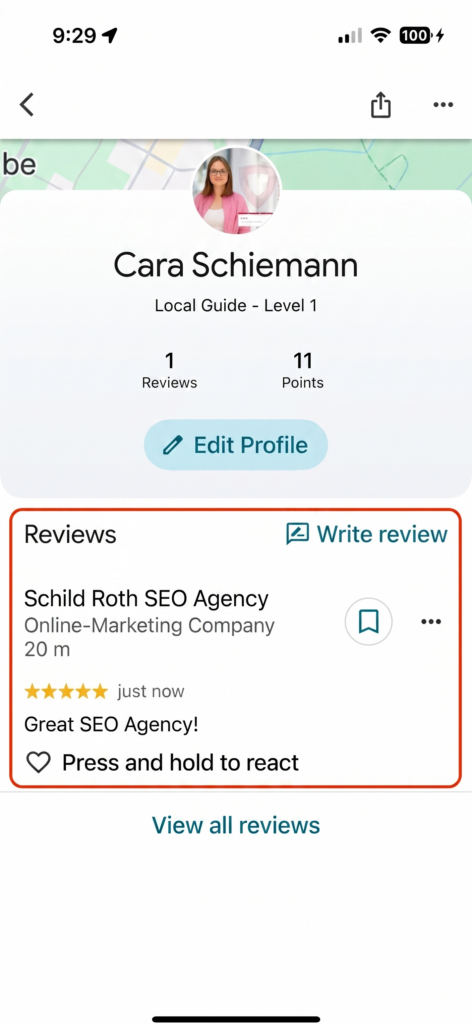
- Deletion Process: Tap on the three dots (⋮) for the corresponding review and select “Delete review”.
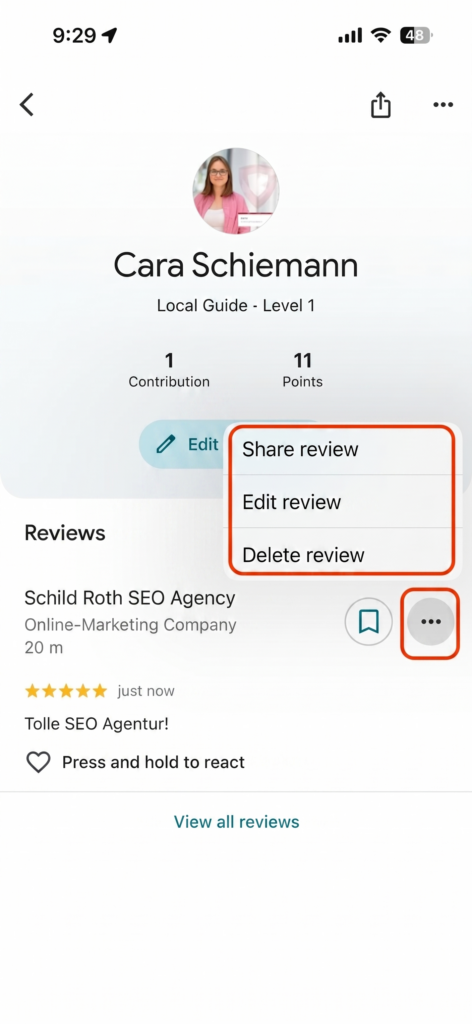
Note: The deletion takes place in real time. However, it may take a few minutes for the change to be fully reflected in Google Search results.
Tip: Do you want to maintain the criticism but adjust the details? Find out here how to edit your Google review.
Report Google Review: Reporting reviews from others
If you encounter a review that violates Google’s guidelines, you can submit it for review as a user (or affected party).
Step-by-step guide to reporting:
- Find the review in question in Google Maps or Google Search.
- Click on the three dots (⋮) in the top right corner of the review text.
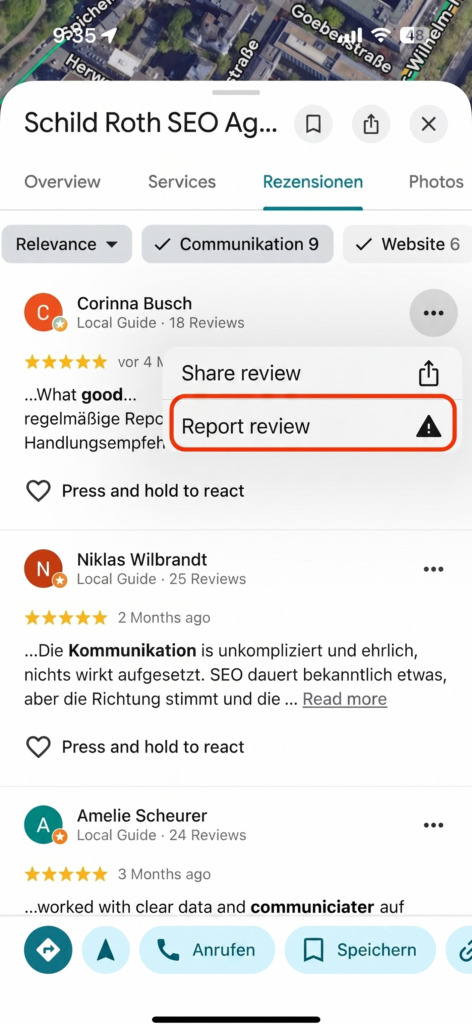
- Select the option “Report review” or “Report as inappropriate”.
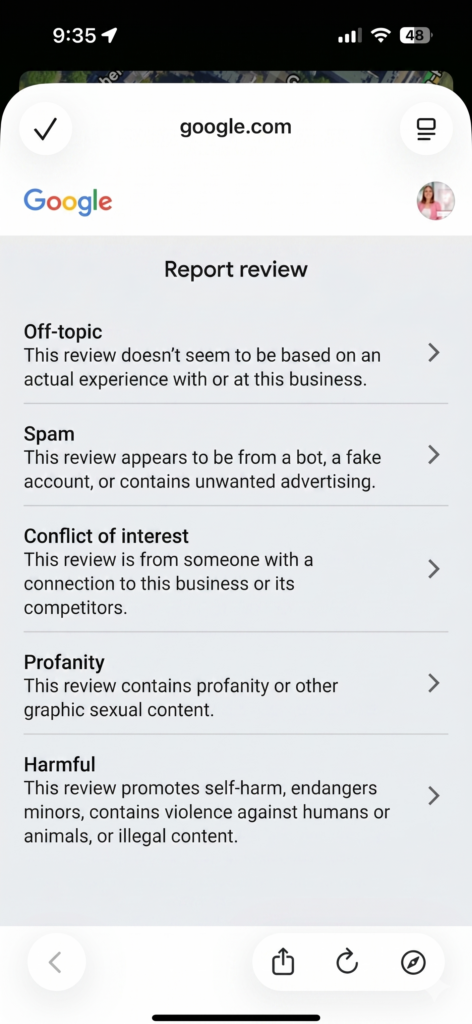
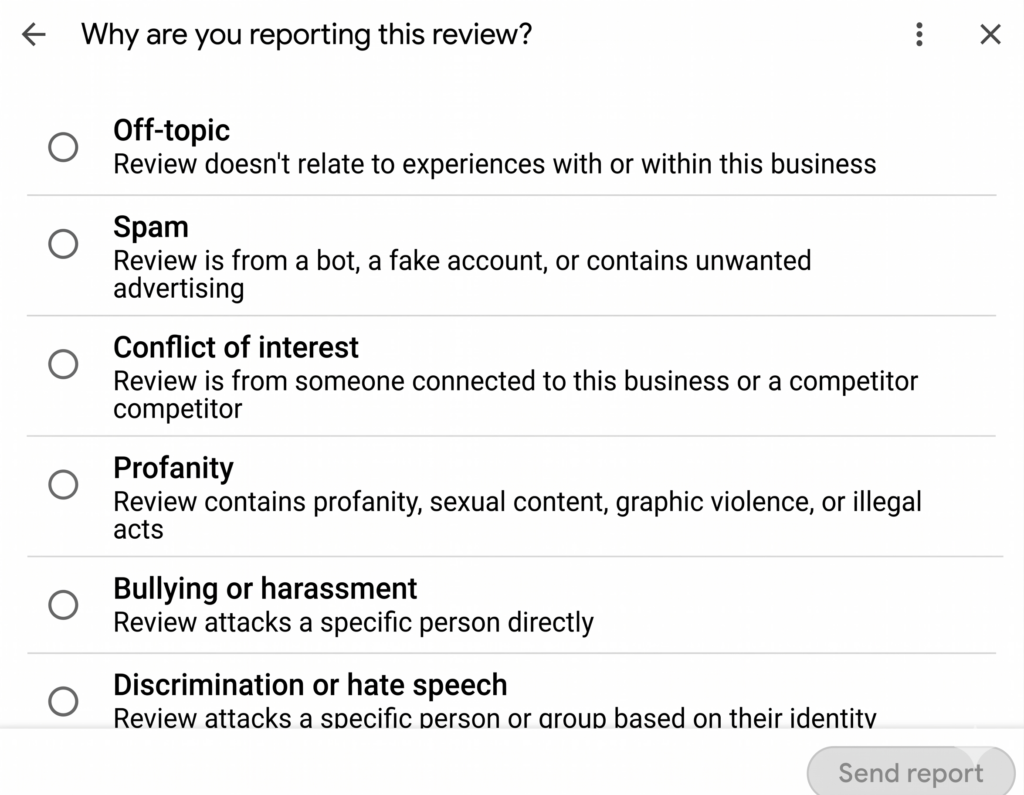
- Specify Reason: Google will now ask you for the reason. Select the category that fits best:
- Spam: Purchased content or multiple postings.
- Off-topic: Review has nothing to do with the business.
- Conflict of Interest: A competitor or (former) employee is writing.
- Insult/Harassment: Personal attacks or obscenities.
- Submit: Confirm your report.
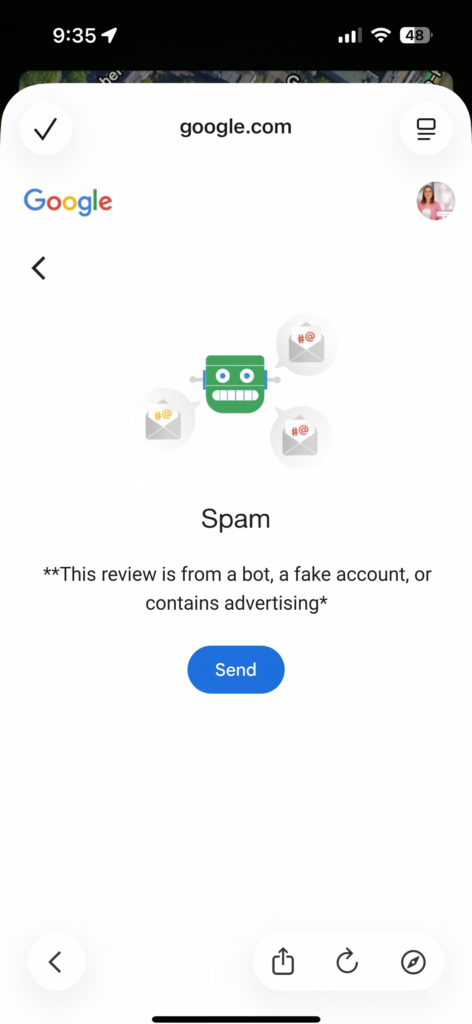
The harsh reality: Manual reports are often checked by automated algorithms. If there is no absolutely clear violation (e.g., profanity), you will usually receive a standard rejection after a few days with the text: “We could not find a violation”.
Our honest recommendation: deletion is the wrong lever
Only reviews that violate Google’s guidelines or applicable law can be removed – fake reviews, defamation or false factual claims. A genuine, factual negative review is protected by freedom of expression and will stay. No one can credibly promise its removal – be careful with providers who do exactly that.
That is why we do not recommend review deletion as a strategy. The sustainable path is the opposite one: continuously building genuine reviews from satisfied customers, as fast as guidelines allow. With 23 reviews, a single 1-star rating visibly drags down your average – with 226, it barely moves.
Our recommendation instead of deletion: continuously build genuine reviews from satisfied customers – automatically and in line with Google’s guidelines. That is exactly what ReviewBird does. Book a free demo now!
Have negative reviews deleted – Option for businesses
As a business owner, you have specific tools to protect your image.
Option 1: Report review via Google Business
Within your dashboard, there is a tool with which you can not only submit reports but also track their status. You can see exactly whether a case is still “under review” or has been “rejected.” In the event of a rejection, you can often file a one-time appeal here.
How to report a review as a business: Step-by-step
- Open your Google Business Profile dashboard.
- Click on “Read reviews.” All reviews will be displayed there.
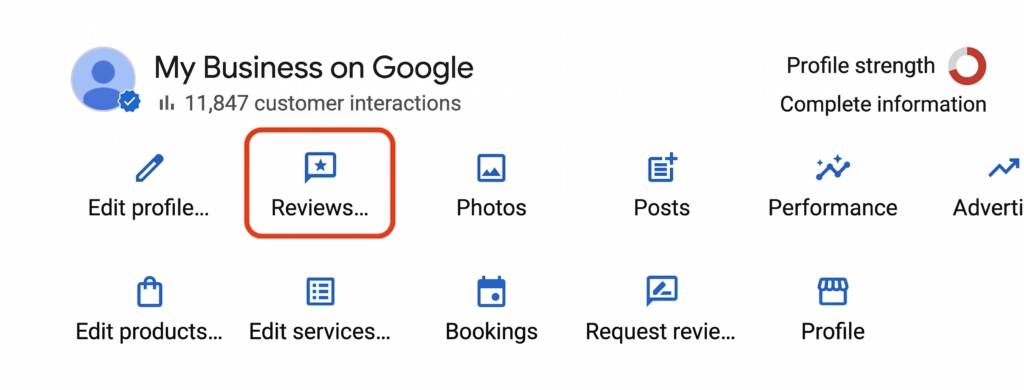
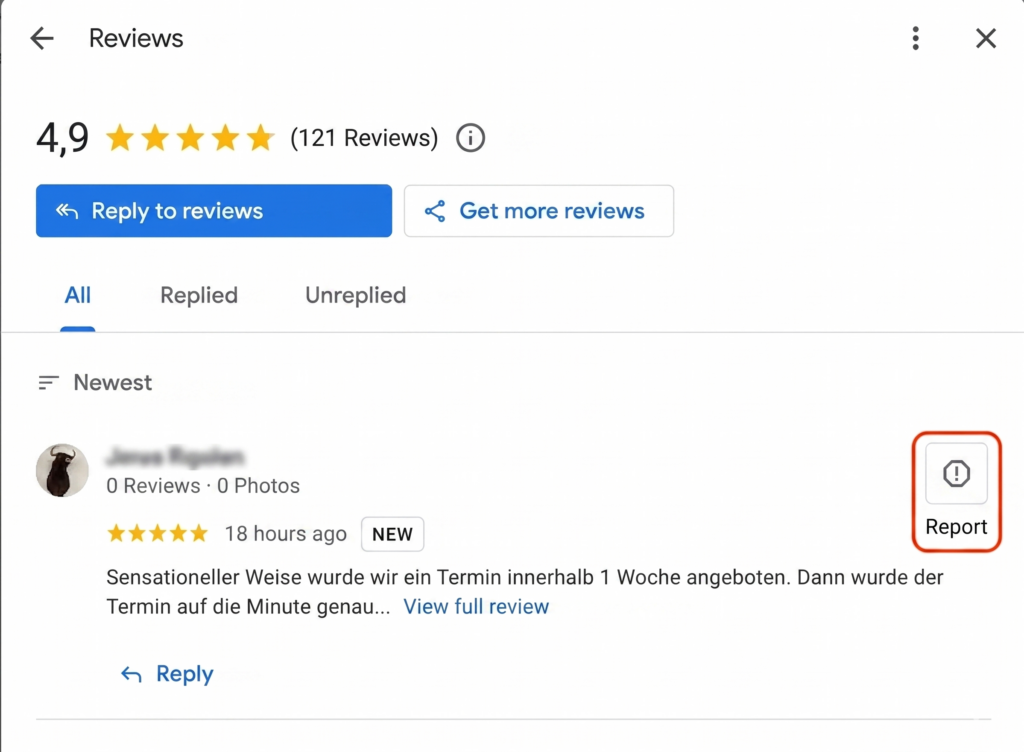
- At the top right next to the review, you will find an exclamation mark to report the review.
- Select a reason for the report and submit it.
Option 2: Contact Google Support
Through the Help Center, you can try to reach chat or email support for more complex cases. This is particularly advisable in cases of identity theft or attempted extortion by customers (“Give me a discount, or I’ll write a negative review”). Be sure to secure evidence for this (screenshots of emails/WhatsApp).
Option 3: Hire a lawyer for review deletion
A lawyer reviews the rating based on current case law (e.g., Federal Court of Justice rulings on portals’ duty to check). Costs of €100 to €300 per case are only worthwhile for clear legal violations – no one can credibly promise the removal of genuine reviews.
Option 4: Respond professionally to the review
Not all criticism is illegal. If deletion is hopeless, the response is your best weapon:
- Objectivity: Thank them for the feedback, even if it hurts.
- Correction: Correct false facts politely without portraying the customer as a liar.
- Show Presence: A good response to a bad review often convinces more new customers than a flawless 5.0-star facade.
Proactive Strategy: Build up positive reviews
Deleting or responding to reviews is often a reaction ✓ to existing problems. A much more sustainable method for your online image is the proactive building of a strong profile. If you regularly receive new 5-star reviews, individual negative voices carry little weight and your overall average stabilizes.
Which reviews violate Google's guidelines
Knowledge is power: Only those who know the guidelines can argue successfully.
| Category | Status | Details |
| Fake reviews | ✓ deletable | User was never a customer (lack of customer contact) |
| Defamatory criticism | ✓ deletable | Only intended for defamation, no factual discussion |
| Insults | ✓ deletable | Use of profanity or disparagement |
| Employee criticism | ✓ deletable | Criticism of specific persons by name (data protection) |
| True facts | 𐄂 remains | “The food was cold.” (if it is verifiable/credible) |
| Subjective opinion | 𐄂 remains | “I didn’t like it there.” (pure perception) |
Overview: Which deletion option fits your situation?
| Method | Suitable for | Duration | Costs |
| Delete yourself (own review) | End consumer | Immediate | Free |
| Report to Google | All | 1–4 weeks | Free |
| Report via Google Business | Business owners | 1–4 weeks | Free |
| Hire a lawyer | Business owners in case of legal violation | 2–12 weeks | €100–300 |
Frequently Asked Questions about Deleting Google Reviews
Can I simply delete a Google review?
You can delete your own reviews immediately via “Your contributions.” For reviews from others, you must provide Google with a valid reason (violation of guidelines). There is no “delete button” for third-party comments, as Google protects freedom of expression.
How much does it cost to have a Google review deleted?
Reporting independently is free of charge. Professional service providers often charge flat fees. Lawyers sometimes work on a success basis with fees between €100 and €300 per case – this is only legitimate for demonstrable guideline or legal violations. We advise against providers who promise the deletion of genuine reviews.
How long does it take for Google to delete a review?
An automated process after a report takes about 3 to 7 days. Legal proceedings via a law firm usually take 2 to 8 weeks, as Google must adhere to deadlines for statements and the process is reviewed by the legal department.
What to do if a fake review is not deleted?
Do not give up. A rejection by the algorithm is standard. In this case, it often only helps to prove that no customer contact took place. We support you in phrasing this proof in a legally secure manner for Google.
Can I hide negative Google reviews?
No, Google does not offer a function to “hide” or “archive” reviews. The only option is deletion or “pushing them down” by collecting new, positive reviews with tools like ReviewBird.
What happens legally if I report reviews falsely?
As long as you act to the best of your knowledge and belief, a report has no negative legal consequences. However, you should not report truthful reviews as “fake” just to improve statistics, as this can lead to problems in the event of legal repercussions.
Instead of deleting bad reviews – ensure more good ones!
Deleting negative reviews is important, but it is a defensive strategy. Go on the offensive! ReviewBird automates your review process. We help you ask satisfied customers for their vote at exactly the right moment.
- Better Ranking: More reviews mean higher visibility.
- Trust: An average of 4.8 with 200 reviews looks more credible than a flat 5.0 with only 3 reviews.
- Automation: Save time and let ReviewBird do the work.
Put an end to the worry about bad stars. Increase your average sustainably and automatically. How it works!
Further content related to Google reviews

Founder, Managing Director ReviewBird
Timothy Scherman is an experienced SEO expert and digital marketing consultant with over ten years of expertise in online marketing. As the founder of Doc Marketing, he supports doctors and medical institutions in increasing their visibility and successfully acquiring new patients.
Founder, Managing Director
ReviewBird


