


Edit My Google Reviews: How It Works
- Simply explained with video click instructions


Did you know that you can edit or delete your Google reviews yourself? Or are you wondering how to do this quickly and easily? Google reviews can be adjusted without any problems. In this guide, you will learn how to edit or delete your reviews in a straightforward manner.
Summary: Edit My Google Review
- Edit review: Simply adjust the text or star rating to update your feedback.
- Delete: Remove unwanted reviews directly via the Google Maps app or website
Why This Feature Is So Important
Get 10x more reviews with ReviewBird!
Step-by-Step Instructions:
- Visit the Google Maps website or open the app.
- Click on the “Menu” (the three horizontal lines in the upper left) or your profile picture.
- Search for “my profile” or “my reviews”.
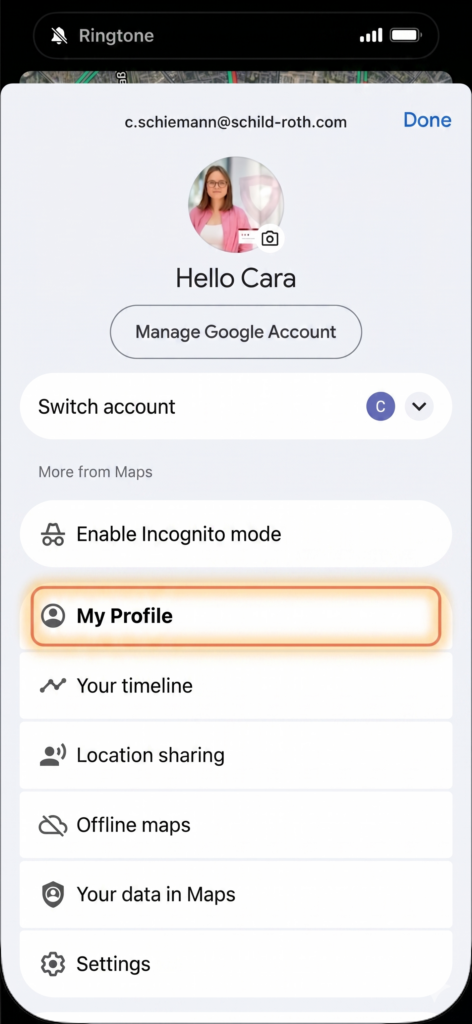
- Find and click on the review you want to edit or delete.
- Click on the three dots next to the review and select “Edit review” or “Delete review”.
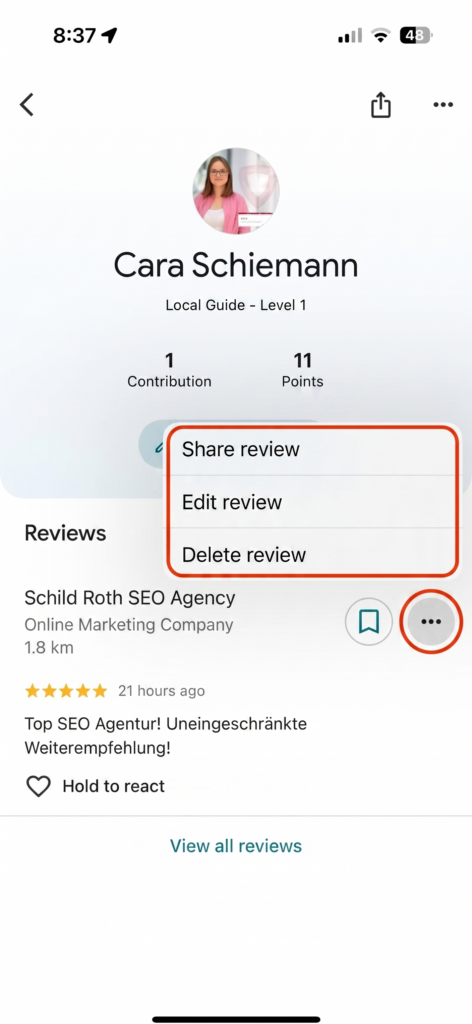
- Under “Edit review” you can adjust the text or star rating. Select “Delete review” to permanently remove the review.
Notes
- It is only possible to edit or delete your own reviews; reviews from other users can neither be edited nor deleted.
- Reviews can only be edited or deleted if you are signed in to your Google account.
Conclusion
Your own Google reviews can be easily edited or deleted in the Google Maps app or on the website. Important: You can only change your own reviews and must be logged in to do so.
Frequently Asked Questions About Editing Google Reviews
Why is the edit button missing for me?
The “Edit” button only appears if you are signed in with the exact Google account you used to originally write the review. Therefore, check in the Google Maps app or in the browser at the top right whether you are using the correct profile. If the review has already been deleted or blocked by Google due to a policy violation, the editing option will also disappear.
Why is my review not displayed?
Google uses automated filters to identify spam and fake content; in the process, genuine reviews can sometimes be incorrectly flagged as policy violations. Common reasons include the use of links, phone numbers, or an IP address that Google considers suspicious. Sometimes a review is only released after manual review by Google, which can particularly occur with new accounts.
How long does it take for the change to be published?
As a rule, changes to a review are publicly visible within a few minutes or even immediately. However, it may happen that Google’s servers require some time for synchronization, so the update may not be correctly displayed everywhere until up to 24 hours later. If the change still does not appear after one day, it may have gotten stuck in the spam filter again.
Additional Information About Google Reviews
Remove your own or others’ reviews – what is possible?
Don’t want to create a Google account? These options are still available to you.
Ready-made text templates for tradespeople, doctors, restaurants, and more.
Everything you need to know: Who can review, what counts, how are stars calculated.
Professionally request reviews – with email templates.

Founder, Managing Director, ReviewBird
Timothy Scherman is an experienced SEO expert and digital marketing consultant with over ten years of expertise in online marketing. As the founder of Doc Marketing, he helps doctors and medical facilities increase their visibility and successfully attract new patients.
Founder, Managing Director
ReviewBird


