

Asking Customers for Google Reviews: 20+ Templates & Complete Guide
- Simple requests – direct links for uncomplicated reviews
- Automated & efficient – increase response rates with SMS


Have you ever wondered why the competition is so much more visible on Google Maps than you are? Often it’s not due to better service, but rather an active strategy for customer feedback. Today, Google reviews are the digital equivalent of word-of-mouth – and vital for the survival of local businesses. Yet many entrepreneurs hesitate: too little time, fear of negative feedback, or simply uncertainty about how to address the customer correctly. In this guide, we will show you how to overcome these hurdles. You will receive field-tested methods, over 20 ready-to-use templates for copying, and learn how to easily automate the process with ReviewBird.
Why Google reviews are indispensable for your business
In the digital age, trust is the most important currency. According to current studies, around 93% of consumers read online reviews before making a purchasing decision. A high number of stars acts as a massive trust signal for new customers. When a potential customer searches for a service in their area, the decision between a provider with 4 reviews and one with 150 positive reviews is usually made in seconds.
But it’s not just about psychology: Google reviews are a critical ranking factor for the so-called “Local Pack” in search and on Google Maps. The more recent and positive reviews you receive, the higher Google ranks your relevance.
The problem for many companies is the so-called negativity bias: dissatisfied customers are intrinsically motivated to vent their frustration. Satisfied customers, on the other hand, silently enjoy their product or service. If you do not actively ask for feedback, your public image becomes distorted in favor of the few critics. To paint an authentic and positive picture of your company, you must mobilize the silent, satisfied majority. Actively asking for reviews is not “begging,” but professional reputation management.
The perfect timing: When you should ask for reviews
Timing is everything. If you ask too early, the customer hasn’t gained enough experience yet; if you ask too late, the enthusiasm has faded. The basic rule is: ask for a review when customer satisfaction is at its highest – the so-called “Peak of Delight.”
| Industry | Ideal Timing | Channel |
| Medical Practice / Dentist | 30 minutes after the appointment | SMS or email |
| Restaurant / Gastronomy | Directly after the visit | QR code on receipt |
| Craftsman / Contractor | After acceptance / completion | SMS / WhatsApp |
| Lawyer / Tax Consultant | After case closure | |
| E-commerce / Online Shop | 5–7 days after delivery | Email automation |
| Hairdresser / Cosmetics | Directly after treatment | QR code or in person |
8 proven methods to ask customers for Google reviews
There are many ways to achieve your goal. The key is that the method fits your business model and your customers. Below, we present the most effective strategies to noticeably increase response rates and seamlessly integrate the review process into your daily routine.
1. By email – The classic
Email is ideal for service providers and B2B companies. Wait approximately 24 to 48 hours after the purchase or project end. Use a personalized subject line and include a direct link to your Google profile.
- Advantage: Scalable and professional.
- Pro tip: Use “Smart Links” that open the review window directly instead of just linking to the profile.
2. By SMS / WhatsApp – Direct and personal
SMS has an incredible open rate of up to 98%. Since smartphones are usually within reach, the barrier for a short review is lowest here.
- Advantage: Extremely high conversion rate.
- Pro tip: Keep the text short (max. 160 characters) and ensure GDPR compliance (consent).
3. QR code – Offline to online
Place QR codes where customers have time or are currently paying. A scan leads directly to the Google review form.
- Advantage: No typing required for the customer.
- Pro tip: Use design tools like Canva to create attractive displays with your logo.
4. Asking in person – Most effective
A personal conversation has the highest success rate. When a customer praises you, seize the moment: “I’m very glad to hear that! Would you do us a big favor and share that briefly on Google?”
- Advantage: Personal connection makes a “no” almost impossible.
- Pro tip: Offer to show the QR code directly so the customer can do it right away.
5. On your own website
Integrate a widget that shows your top reviews so far and includes a “Rate now” button. A dedicated review landing page is worth its weight in gold here.
6. Via social media
Use Instagram Stories or Facebook posts to thank your community for their trust and gently remind them about reviews.
- Pro tip: Regularly share positive reviews as social proof – this motivates others to write as well.
7. Flyers, displays & print materials
Printed thank-you cards in the package or displays in the waiting room are constant reminders.
- Locations: Business cards, invoice attachments, menus.
8. Automated via review software
Those who ask manually often forget half of them. Software like ReviewBird automates the sending of invitations via email or SMS. You can set reminders and intercept negative experiences internally before they end up on Google.
- ReviewBird tip: With our platform, you manage all channels centrally and save several hours per week while achieving maximum results.
Automatically receive more Google reviews with ReviewBird – Test it now for free
Step-by-step: How to find your Google review link
To allow your customers to leave a review, they need the direct link to the input form. Here’s how it works:
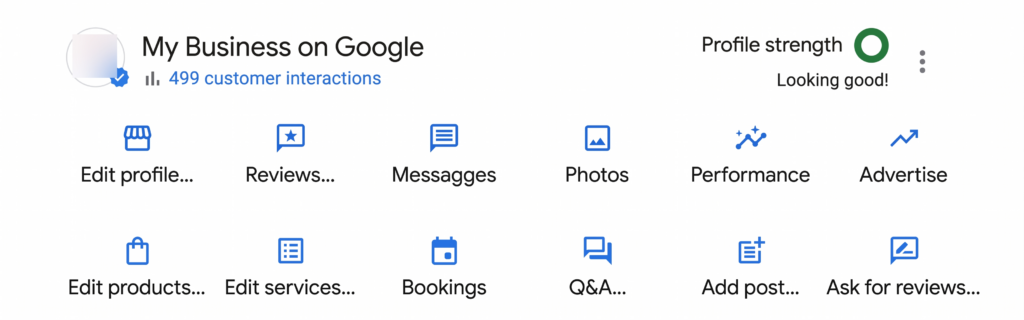
- Access Google Business Profile: Log in at business.google.com or search for your company directly in Google Search.
- Use the dashboard: In the profile management, click on the “Reviews” button. Then click on “Ask for reviews” (or “Get more reviews”).
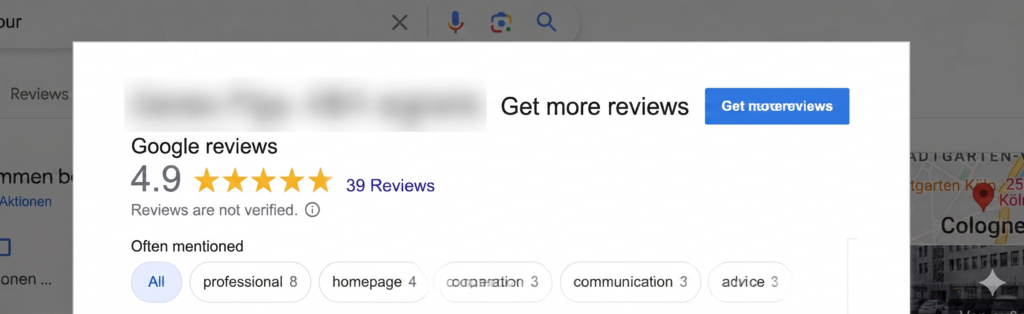
- Copy link: Google generates a short link. Copy this.
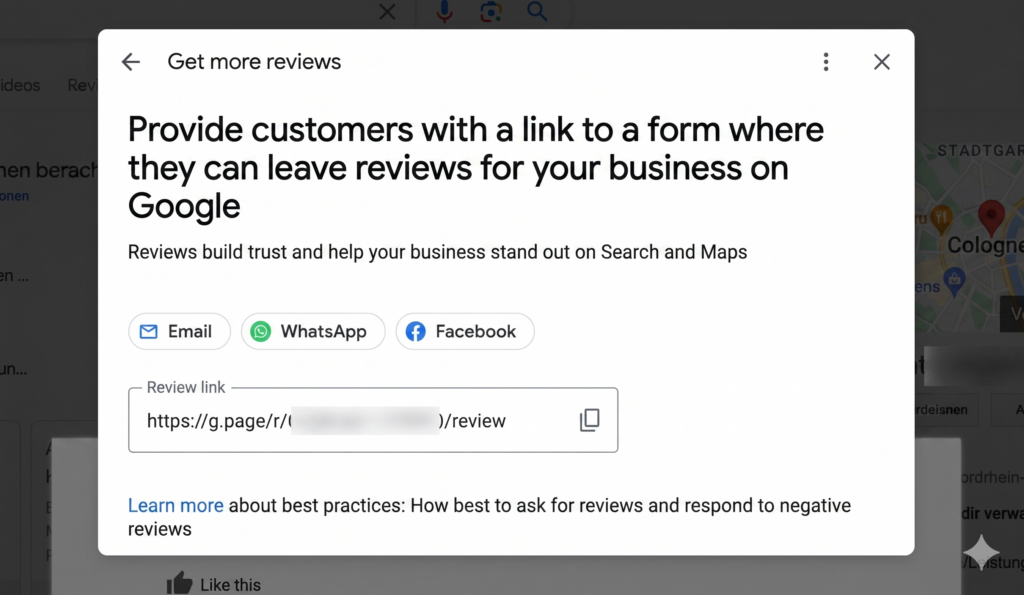
- Use it: Use this link in your emails, SMS, or convert it into a QR code.
20+ Templates: Asking customers for a Google review (Copy & Paste)
Simply adapt the following templates by replacing the placeholders in brackets […].
Email templates
1. General template (after purchase/project)
Subject: How satisfied are you with us, [Name]?
Hello [Name],
Thank you for your trust in [Company Name]. We hope you are satisfied with [Product/Service]. To help us continuously improve, your feedback is very valuable to us.
May we ask for 30 seconds of your time?
Click here: [Link]
Kind regards,
[Your Name]
2. After a doctor/practice visit
Subject: Your visit to [Practice Name]
Hello [Name],
We hope you felt well taken care of with us. We would like to make it easier for other patients to find a good practice. We would be very pleased to receive a short Google review:
[Link]
Your team at [Practice Name]
3. After a craftsman service
Subject: Everything to your satisfaction at [Service]?
Hello [Name],
The work on your project has been completed. We hope you like the result! As a local business, we thrive on recommendations. If you were satisfied, please leave us a short review:
[Link]
Best regards,
[Your Name]
4. For gastronomy
Subject: Was it delicious at [Restaurant Name]?
Hello [Name],
Thank you for visiting us! We hope you had a great evening. Did you enjoy your meal? Then please spread the word:
[Link]
See you soon, your team at [Restaurant Name]
5. After a consultation (lawyer/tax consultant)
Subject: Feedback on our collaboration
Dear [Name],
We are pleased that we could support you in your matter. Your feedback is important to us to further optimize our service. We look forward to your review:
[Link]
Yours sincerely,
[Your Name]
SMS / WhatsApp templates
Hi [Name], thanks for your visit! Do you have 20 seconds for a Google review? You would really help us out: [Link]
Best regards,
[Name]
Hello [Name], how satisfied were you with [Service]? We would be thrilled to receive your feedback: [Link]. Thanks!
Care to give some quick feedback? 😊 Show others how satisfied you were at [Company]
: [Link] Thanks!
Thanks for the nice chat today! If you’d like to support us: A Google review only takes 1 minute, but helps us and others a lot: [Link]
Examples of personal address
At checkout
“Glad everything worked out! If you have time, we would be thrilled to receive a small Google review. That helps us enormously as a local shop.”
After a compliment
“Thank you very much for the compliment! May I ask you to write exactly that in a short Google review? It will help other customers find us more easily.”
On the phone
“I’m glad you’re satisfied with the solution. If you’d like to do us a favor: we’re currently collecting feedback on Google. I’d be happy to send you the link via SMS/email.”
Templates for social media posts (3 items)
Instagram Story
Love our [Service/Product]? 💖 Support us with a Google review! Link in bio.
Facebook Post
We’re celebrating 10 years of [Company]! 🎉 Our biggest gift? Your feedback. Share your experiences with others: [Link]
LinkedIn (B2B)
Successful project completed! Are you convinced by our work? Feedback is the key to excellent consulting. We look forward to your review: [Link]
Templates for flyers & displays
- “Satisfied? Scan me & rate us!”
- “Your opinion counts! Give us Google stars now.”
- “Did you like it? Then tell Google!”
Find Canva templates in postcard and business card format here!
Templates for automated messages
Day 1 (first request):
Hello [Name], thank you for visiting our practice. How was your experience? We look forward to a review on Google: [Link]
Day 5 (reminder):
Quick reminder in case you forgot: Your feedback on your visit would help us a lot! Click here to review: [Link]
With ReviewBird, this process becomes automatic. Our fully automated system takes over the sending of requests, so you continuously receive new reviews without having to think about it yourself. Try our system now for free!
Do’s & Don’ts: You should definitely avoid these mistakes
| ✅ DOS | ❌ DON’TS |
| Address personally and by name | Mass emails without personalization |
| Ask at the right time | Buy or fake reviews |
| Make it as easy as possible | Put customers under pressure |
| Respond to EVERY review | Discounts/gifts as a reward |
| Use multiple channels | Only ask for 5-star reviews |
| State a specific reason | Wait too long after the service |
Legal aspects: What is allowed, what is not?
In Germany, the UWG (Act Against Unfair Competition) and Google guidelines regulate the framework for reviews.
- No incentivization: It is forbidden to offer benefits (discounts, gifts, competitions) for reviews. Google considers this bribery and it can lead to the deletion of the profile.
- No gate-keeping: You are not allowed to select only satisfied customers and exclude dissatisfied ones from the review process.
- Data protection (GDPR): If you use emails or SMS for review invitations, you theoretically need the customer’s consent. It is best to use the declaration of consent within the framework of your service contract.
- Authenticity: Forged reviews (fake reviews) are absolutely taboo and can lead to warnings under competition law.
Frequently asked questions about asking for reviews – FAQ
Are you allowed to ask customers for a Google review?
Yes, this is absolutely allowed and even encouraged by Google, as long as the request is phrased neutrally and no reward is offered.
How do you phrase a request for a review?
Politely, briefly, and transparently. Explain that the feedback helps you get better and serves as a guide for other customers.
Where can I find my Google review link?
In your Google Business Profile under “Read reviews” -> “Get more reviews.”
How many reviews does a company need?
There is no fixed number, but you should receive new reviews regularly. Having more than the competition in your area is a good benchmark.
What to do if customers don't respond?
Send a friendly reminder after 5–7 days. Use different channels (e.g., email first, then SMS).
Can Google reviews be deleted?
Only if they violate Google guidelines (spam, insult, fake). An “uncomfortable” but genuine opinion cannot be deleted.
Is it allowed to give discounts for reviews?
No. According to Google guidelines and German competition law, this is anti-competitive.
How do I respond professionally to negative reviews?
Stay objective, apologize for any inconvenience, and offer to resolve the problem offline (phone/email).
Conclusion
Google reviews don’t fall from the sky – they are the result of an active strategy. Those who have the courage to ask, use the right timing, and make it as easy as possible for their customers with links and QR codes will be rewarded: with more visibility, more trust, and ultimately more revenue. Start letting your satisfied customers have their say today!
Would you like to automate the process and never miss a review opportunity again? ReviewBird helps you put your feedback management on autopilot.
Google reviews on autopilot – Book a free ReviewBird demo
Further information about Google reviews
Don’t want to create a Google account? You still have these options.
Ready-made text templates for craftsmen, doctors, restaurants, and more.
Remove your own or others’ reviews – what is possible?
Change or update your submitted review later.
Everything worth knowing: who can rate, what counts, how stars are calculated.
Strategies and tools for more and better reviews.

Founder, Managing Director ReviewBird
Timothy Scherman is an experienced SEO expert and digital marketing consultant with over ten years of expertise in online marketing. As the founder of Doc Marketing, he helps doctors and medical facilities increase their visibility and successfully attract new patients.
Founder, Managing Director
ReviewBird


